- All Operations
- Operation Specifications
- Error Code and Error Messages
Functional Overview
All Operations
The API supports the following distinct data records for consumption:
| Name | Description |
|---|---|
| GetEmployees | Returns a list of employee records |
| GetSchedules | Returns a list of schedules records |
| GetPunches | To get a list of punches records |
| GetCertifications | To get a list of certification records |
| GetKeywords | Returns a list of keywords by category |
| GetPayrollDetails | Returns a list of payroll-related records |
| GetTimecards | Returns a list of timecard-related records. The closest analog in the software is Timekeeping > Timecards. |
| PutEmployeeProfile | Insert the employee profile information into ePro Scheduler Plus |
| PutEmployeeCertification | Insert the employee certification information into ePro Scheduler Plus |
Operation Specifications
GetEmployees
Description
This will return a list of all active employees' info.
Signature
EmployeeResponse GetEmployees(string customerId, string password, string vendorKey, string employeeId);
Request Parameters
| Name | Type | Description |
|---|---|---|
| custId | string | CustomerId |
| pass | string | Password |
| vendorKey | string | Vendor key |
| empId | string | Employee id (optional parameter) |
EmployeeResponse (in XML format)
| Name | Type | Description |
|---|---|---|
| Status | int | 0 = Successful, -1 = Unsuccessful |
| ErrorCode | int | Error Code |
| ErrorMessage | string | Error Message |
| Employees | Employee[] | An array of employees in XML format |
<EmployeeResponse xmlns="http://schemas.datacontract.org/2004/07/API.Service" xmlns:i="http://www.w3.org/2001/XMLSchema-instance">
  <ErrorCode>0</ErrorCode>
  <ErrorMessage><ErrorMessage />
  <Status>0</Status>
  <Employees>
    <Employee>
      <EmployeeId>2824</EmployeeId>
      <FirstName>Julie</FirstName>
      <LastName>Crane</LastName>
      <CellPhone>555-555-5555</CellPhone>
      <Pager>555-555-5555</Pager>
      <EmailAddress>[email protected]</EmailAddress>
      <Status>0</Status>
      <HomeCostCenter>421</HomeCostCenter>
      <Address>14 First Avenue</Address>
      <City>Blaine</City>
      <State>MN</State>
      <Zip>55423</Zip>
      <FTHireDate>10/20/2004</FTHireDate>
      <HireDate>10/20/2004</HireDate>
      <BirthDate>09/04/1974</BirthDate>
    </Employee>
  </Employees>
</EmployeeResponse>
C# Code Sample
The following C# code shows how to call GetEmployees:
string serviceUri = string.Format("https://<api_url>/EmployeeService.svc/GetEmployees?custId={0}&pass={1}&vendorKey={2}&empId={3}",
    customerId, password, vendorKey, employeeId);

HttpWebRequest request = (HttpWebRequest)WebRequest.Create(serviceUri);

HttpWebResponse response = (HttpWebResponse)request.GetResponse();

StreamReader sr = new StreamReader(response.GetResponseStream());

string result = sr.ReadToEnd();

Console.WriteLine();
Console.ReadKey();
GetSchedules
Description
This will return a list of schedule info that meets the criteria: Called from external application.
Signature
ScheduleResponse GetSchedules(string customerId, string password, string vendorKey, string employeeId, string startTime, string endTime, string companyCode);
Request Parameters
| Name | Type | Description |
|---|---|---|
| custId | string | Customer id |
| Pass | string | Password |
| vendorKey | string | Vendor key |
| empId | string | Employee Id (optional) |
| starttime | string | schedule start time |
| endtime | string | schedule end time |
| companyCode | string | Company Code (optional) |
ScheduleResponse (in XML format)
| Name | Type | Description |
|---|---|---|
| Status | int | 0 = Successful, -1 = Unsuccessful |
| ErrorCode | int | Error Code |
| ErrorMessage | string | Error Message |
| Schedules | Schedule[] | An array of schedules in XML format |
<ScheduleResponse xmlns="http://schemas.datacontract.org/2004/07/API.Service" xmlns:i="http://www.w3.org/2001/XMLSchema-instance">
  <Status>0</Status>
  <ErrorCode>0</ErrorCode>
  <ErrorMessage><ErrorMessage />
  <Schedules>
    <Schedule>
      <EmployeeId>0</EmployeeId>
      <StartTime>3/23/2008 8:00:00 PM</StartTime>
      <EndTime>3/23/2008 6:00:00 PM</EndTime>
      <Duration>12</Duration>
      <Qualification>Pilot</Qualification>
      <UnitName>BLS 12</UnitName>
      <CostCenter>002</CostCenter>
      <EarningCode>R</EarningCode>
      <ResourceType>NA</ResourceType>
      <Comments>Weather Check in AM</Comments>
      <VehicleName>482</ VehicleName>
      <InServiceTime>3/23/2008 8:20:00 AM</ InServiceTime>
      <OutOfServiceTime>3/23/2008 5:04:00 PM</ OutOfServiceTime>
      <ItemId>303</ItemId>
      <ShiftId>0</ShiftId>
    </Schedule>
    <Schedule>
      <EmployeeId>10494</EmployeeId>
      <StartTime>3/24/2008 8:00:00 AM</StartTime>
      <EndTime>3/24/2008 4:00:00 PM</EndTime>
      <Duration>8</Duration>
      <Qualification>Admin</Qualification>
      <UnitName>Base 7</UnitName>
      <CostCenter>004</CostCenter>
      <EarningCode>R</EarningCode>
      <ResourceType>NA</ResourceType>
      <Comments>Weather Check in AM</Comments>
      <VehicleName>483</ VehicleName>
      <InServiceTime>3/23/2008 8:20:00 AM</ InServiceTime>
      <OutOfServiceTime>3/23/2008 5:04:00 PM</ OutOfServiceTime>
      <ItemId>302</ItemId>
      <ShiftId>0</ShiftId>
    </Schedule>
  </Schedules>
</ScheduleResponse>
C# Code Sample
The following C# code shows how to call GetSchedules:
string serviceUri = string.Format("https://<api_url>/EmployeeService.svc/GetSchedules?custId={0}&pass={1}&vendorKey={2}&empId={3}&startTime={4}&endTime={5}",
    customerId, password, vendorKey, employeeId, startTime, endTime);

HttpWebRequest request = (HttpWebRequest)WebRequest.Create(serviceUri);

HttpWebResponse response = (HttpWebResponse)request.GetResponse();

StreamReader sr = new StreamReader(response.GetResponseStream());

string result = sr.ReadToEnd();

Console.WriteLine();
Console.ReadKey();
GetPunches
Description
This will return a list of punch info that meets the criteria: Called from external application.
Signature
PunchResponse GetPunches(string customerId, string password, string vendorKey, string employeeId, string startTime, string endTime);
Request Parameters
| Name | Type | Description |
|---|---|---|
| custId | string | Customer id |
| Pass | string | Password |
| vendorKey | string | Vendor key |
| empId | string | Employee Id (optional) |
| starttime | string | Start time |
| endtime | string | End time |
PunchResponse (in XML format)
| Name | Type | Description |
|---|---|---|
| Status | int | 0 = Successful, -1 = Unsuccessful |
| ErrorCode | int | Error Code |
| ErrorMessage | string | Error Message |
| Punches | Punch[] | An array of punches in XML format |
<PunchResponse xmlns="http://schemas.datacontract.org/2004/07/API.Service" xmlns:i="http://www.w3.org/2001/XMLSchema-instance">
  <Status>0</Status>
  <ErrorCode>0</ErrorCode>
  <ErrorMessage><ErrorMessage />
  <Punches>
    <Punch>
      <PunchId>30032</PunchId>
      <EmployeeId>8776</EmployeeId>
      <InPunchTime>1/1/2020 8:00:00 AM</InPunchTime>
      <OutPunchTime>1/2/2020 2:55:34 PM</OutPunchTime>
      <FirstName>Samuel</FirstName>
      <LastName>Smith</LastName>
      <StartComment>Hello</StartComment>
      <EndComment>Happy New Year</EndComment>
      <eHomeCostCenter>001</eHomeCostCenter>
    </Punch>
    <Punch>
      <PunchId>30132</PunchId>
      <EmployeeId>99110</EmployeeId>
      <InPunchTime>1/3/2020 7:56:00 AM</InPunchTime>
      <OutPunchTime>1/3/2020 9:00:00 PM</OutPunchTime>
      <FirstName>Samantha</FirstName>
      <LastName>Smith</LastName>
      <StartComment>Hello</StartComment>
      <EndComment>Happy New Year</EndComment>
      <eHomeCostCenter>003</eHomeCostCenter>
    </Punch>
  </Punches>
</PunchResponse>
C# Code Sample
The following C# code shows how to call GetPunches:
string serviceUri = string.Format("https://<api_url>/EmployeeService.svc/GetPunches?custId={0}&pass={1}&vendorKey={2}&empId={3}&startTime={4}&endTime={5}",
    customerId, password, vendorKey, employeeId, startTime, endTime);

HttpWebRequest request = (HttpWebRequest)WebRequest.Create(serviceUri);

HttpWebResponse response = (HttpWebResponse)request.GetResponse();

StreamReader sr = new StreamReader(response.GetResponseStream());

string result = sr.ReadToEnd();

Console.WriteLine();
Console.ReadKey();
GetCertifications
Description
This will return a list of certifications info that meets the criteria: Called from external application.
Signature
CertificationResponse GetCertifications(string customerId, string password, string vendorKey, string employeeId);
Request Parameters
| Name | Type | Description |
|---|---|---|
| custId | string | Customer id |
| Pass | string | Password |
| vendorKey | string | Vendor key |
| empId | string | Employee Id (optional) |
Response Result (in XML format)
| Name | Type | Description |
|---|---|---|
| Status | int | 0 = Successful, -1 = Unsuccessful |
| ErrorCode | int | Error Code |
| ErrorMessage | string | Error Message |
| Certifications | Certification[] | An array of certifications in XML format |
<CertificationResponse xmlns="http://schemas.datacontract.org/2004/07/API.Service" xmlns:i="http://www.w3.org/2001/XMLSchema-instance">
  <Status>0</Status>
  <ErrorCode>0</ErrorCode>
  <ErrorMessage><ErrorMessage />
  <Certifications>
    <Certification>
      <EmployeeId>10490</EmployeeId>
      <CertificationName>CPR</CertificationName>
      <CertificationNumber>123</CertificationNumber>
      <EffectiveDate>9/25/2013 12:00:00 AM</EffectiveDate>
      <ExpirationDate>9/25/2014 12:00:00 AM</ExpirationDate>
    </Certification>
    <Certification>
      <EmployeeId>10491</EmployeeId>
      <CertificationName>Medic</CertificationName>
      <CertificationNumber>123</CertificationNumber>
      <EffectiveDate>9/25/2013 12:00:00 AM</EffectiveDate>
      <ExpirationDate>9/25/2014 12:00:00 AM</ExpirationDate>
    </Certification>
  </Certifications>
</CertificationResponse>
C# Code Sample
The following C# code shows how to call GetCertifications:
string serviceUri = string.Format("https://<api_url>/EmployeeService.svc/GetCertifications?custId={0}&pass={1}&vendorKey={2}&empId={3}",
    customerId, password, vendorKey, employeeId);

HttpWebRequest request = (HttpWebRequest)WebRequest.Create(serviceUri);

HttpWebResponse response = (HttpWebResponse)request.GetResponse();

StreamReader sr = new StreamReader(response.GetResponseStream());

string result = sr.ReadToEnd();

Console.WriteLine();
Console.ReadKey();
GetKeywords
Description
Retrieves keywords by category. The categories are the strings available from the
Administrator > Keywords > Keyword Lists dropdown.
Specify one of the following values in the keywordType parameter (required):
CompanyCodes, CostCenter, District, EarningCodes, JobCodes, JobSteps
Signature
KeywordResponse GetKeywords(string customerId, string password, string vendorKey, string keywordType)
Request Parameters
| Name | Type | Description |
|---|---|---|
| custId | string | Customer id |
| Pass | string | Password |
| vendorKey | string | Vendor key |
| keywordType | string | A keyword category, such as EarningCodes or CostCenter. |
Response Result (in XML format)
| Name | Type | Description |
|---|---|---|
| Status | int | 0 = Successful, -1 = Unsuccessful |
| ErrorCode | int | Error Code |
| ErrorMessage | string | Error Message |
| Keywords | Keyword[] | An array of keyword values in XML format |
<KeywordResponse xmlns="http://schemas.datacontract.org/2004/07/API.Service" xmlns:i="http://www.w3.org/2001/XMLSchema-instance">
  <ErrorCode>0</ErrorCode>
  <ErrorMessage />
  <Status>0</Status>
  <Keywords>
    <Keyword>
      <Value>Earning Codes</Value>
    </Keyword>
    <Keyword>
      <Value>1</Value>
    </Keyword>
    <Keyword>
      <Value>1.RE</Value>
    </Keyword>
  </Keywords>
</KeywordResponse>
C# Code Sample
The following C# code shows how to call GetKeywords:
string serviceUri = string.Format("https://<api_url>/EmployeeService.svc/GetKeywords?custId={0}&pass={1}&vendorKey={2}&keywordType={3}",
    customerId, password, vendorKey, keywordType);

HttpWebRequest request = (HttpWebRequest)WebRequest.Create(serviceUri);

HttpWebResponse response = (HttpWebResponse)request.GetResponse();

StreamReader sr = new StreamReader(response.GetResponseStream());

string result = sr.ReadToEnd();

Console.WriteLine();
Console.ReadKey();
GetPayrollDetails
Description
Retrieves payroll-related information in a scheduling context per employee.
Signature
PayrollDetailResponse GetPayrollDetails(string customerId, string password, string vendorKey, string startTime, string endTime)
Request Parameters
| Name | Type | Description |
|---|---|---|
| custId | string | Customer id |
| Pass | string | Password |
| vendorKey | string | Vendor key |
| startTime | string | Schedule Start Time |
| endTime | string | Schedule End Time |
Response Result (in XML format)
| Name | Type | Description |
|---|---|---|
| Status | int | 0 = Successful, -1 = Unsuccessful |
| ErrorCode | int | Error Code |
| ErrorMessage | string | Error Message |
| PayrollDetails | PayrollDetail[] | An array of payroll detail records in XML format |
<PayrollDetailResponse xmlns="http://schemas.datacontract.org/2004/07/API.Service" xmlns:i="http://www.w3.org/2001/XMLSchema-instance">
    <ErrorCode>0</ErrorCode>
    <ErrorMessage/>
    <Status>0</Status>
    <PayrollDetails>
        <PayrollDetail>
            <CostCenter i:nil="true"/>
            <Date>8/27/2019</Date>
            <Duration>12:00</Duration>
            <Duration2>12.00</Duration2>
            <EarningCode>R</EarningCode>
            <EmpID>55555</EmpID>
            <Employee>Anderson, Bob</Employee>
            <EndTime>18:00</EndTime>
            <FlatPay/>
            <HireStatus>Full-Time</HireStatus>
            <HomeCostCenter>001</HomeCostCenter>
            <ItemType>Regular Shift</ItemType>
            <Overtime>00.00</Overtime>
            <PayrollId i:nil="true"/>
            <Regular>12.00</Regular>
            <Shift>SQA1</Shift>
            <StartTime>06:00</StartTime>
        </PayrollDetail>
        <PayrollDetail>
            <CostCenter i:nil="true"/>
            <Date>8/26/2019</Date>
            <Duration>08:00</Duration>
            <Duration2>8.00</Duration>
            <EarningCode>R</EarningCode>
            <EmpID>897646</EmpID>
            <Employee>Bradshaw, Steve</Employee>
            <EndTime>17:00</EndTime>
            <FlatPay/>
            <HireStatus>Part-Time</HireStatus>
            <HomeCostCenter>002</HomeCostCenter>
            <ItemType>Regular Shift</ItemType>
            <Overtime>00.00</Overtime>
            <PayrollId i:nil="true"/>
            <Regular>00.00</Regular>
            <Shift>SQA2</Shift>
            <StartTime>08:00</StartTime>
        </PayrollDetail>
    </PayrollDetails>
</PayrollDetailResponse>
C# Code Sample
The following C# code shows how to call GetPayrollDetails:
string serviceUri = string.Format("https://<api_url>/EmployeeService.svc/GetPayrollDetails?custId={0}&pass={1}&vendorKey={2}&startTime={3}&endTime={4}",
    customerId, password, vendorKey, startTime, endTime);

HttpWebRequest request = (HttpWebRequest)WebRequest.Create(serviceUri);

HttpWebResponse response = (HttpWebResponse)request.GetResponse();

StreamReader sr = new StreamReader(response.GetResponseStream());

string result = sr.ReadToEnd();

Console.WriteLine();
Console.ReadKey();
GetTimecards
Description
Retrieves timecards. Output is nearly analogous to Timekeeping > Timecards.
The pay period ID can be found from Scheduling > Schedule Worksheet or Timekeeping > Timecards, among other places. Right-click the dropdown and Inspect with Chrome Developer Tools to find the desired pay period ID.
Please refer to corresponding output in Timekeeping > Timecards for the status values.
Signature
TimecardResponse GetTimecards(string customerId, string password, string vendorKey, string startTime, string endTime, int payPeriodId, int weekNumber)
Request Parameters
| Name | Type | Description |
|---|---|---|
| custId | string | Customer id |
| Pass | string | Password |
| vendorKey | string | Vendor key |
| startTime | string | Pay period start date |
| endTime | string | Pay period end date |
| payPeriodId | int | Pay period ID |
| weekNumber | int | The week number of a biweekly pay period (1 or 2). |
Response Result (in XML format)
| Name | Type | Description | ||||||||||||||
|---|---|---|---|---|---|---|---|---|---|---|---|---|---|---|---|---|
| Status | int | 0 = Successful, -1 = Unsuccessful | ||||||||||||||
| ErrorCode | int | Error Code | ||||||||||||||
| ErrorMessage | string | Error Message | ||||||||||||||
| Timecards | Timecard[] |
An array of time card values in XML format. Following are column descriptions of some of the numeric values.
|
<TimecardResponse xmlns="http://schemas.datacontract.org/2004/07/API.Service" xmlns:i="http://www.w3.org/2001/XMLSchema-instance">
  <ErrorCode>0</ErrorCode>
  <ErrorMessage />
  <Status>0</Status>
  <Timecards>
    <Timecard>
      <ApprovalStatus>0</ApprovalStatus>
      <Comments> </Comments>
      <DateSubmitted />
      <EmpId>555555</EmpId>
      <FirstName>Ingrid</FirstName>
      <HasPunches>0</HasPunches>
      <HasScheduleItems>0</HasScheduleItems>
      <LastName>Smith</LastName>
      <Mi>T</Mi>
      <PartialApproved />
      <PartialApprovedOn />
      <Status>2</Status>
      <SupervisorApproved>0</SupervisorApproved>
      <SupervisorApprovedOn />
    </Timecard>
  </Timecards>
</TimecardResponse>
C# Code Sample
The following C# code shows how to call GetTimecards:
string serviceUri = string.Format("https://<api_url>/EmployeeService.svc/GetTimecards?custId={0}&pass={1}&vendorKey={2}&startTime={3}&endTime={4}&payPeriodId={5}&weekNumber={6}",
    customerId, password, vendorKey, startTime, endTime, payPeriodId, weekNumber);

HttpWebRequest request = (HttpWebRequest)WebRequest.Create(serviceUri);

HttpWebResponse response = (HttpWebResponse)request.GetResponse();

StreamReader sr = new StreamReader(response.GetResponseStream());

string result = sr.ReadToEnd();

Console.WriteLine();
Console.ReadKey();
PutEmployeeProfile
Description
This will insert the employee profile information into ESO Scheduler Plus for the designated customer. The insert will fail if the Employee ID exists.
To support backward compatibility with API v1.2, PayPayType may be used
instead of PayType.
Signature
EmployeeProfileResponse PutEmployeeProfile(EmployeeProfileRequest request);
Request Body
An EmployeeProfileRequest object in XML format.
<EmployeeProfileRequest xmlns="https://www.net-scheduler.com/eProPlus">
  <CustomerId>developer</CustomerId>
  <Password>password</Password>
  <VendorKey>Sunbee</VendorKey>
  <EmployeeProfile>
    <EmployeeId>5555511</EmployeeId>
    <FirstName>Patrick</FirstName>
    <LastName>Fitzsimmons</LastName>
    <HireDate>12/21/2016 5:00:39 PM</HireDate>
    <FTHireDate>9/21/2016 5:00:39 PM</FTHireDate>
    <PayRate>40.50</PayRate>
    <PayType>H</PayType>
    <Address>8360 LBJ Fwy, Suite #255</Address>
    <City>Dallas</City>
    <State>TX</State>
    <Zip>75243</Zip>
    <HomePhone>888-123-3435</HomePhone>
    <Pager>888-121-3344</Pager>
    <CellPhone>888-121-3344</CellPhone>
    <EmergencyContactPhone>888-121-3344</EmergencyContactPhone>
    <EmergencyContactPerson>Justin Custer</EmergencyContactPerson>
    <EmailAddress>[email protected]</EmailAddress>
    <HomeCostCenter>001</HomeCostCenter>
    <DOB>1/5/1990</DOB>
    <Race></Race>
    <Gender></Gender>
  </EmployeeProfile>
</EmployeeProfileRequest>
EmployeeProfileRequest Object
| Name | Type | Description |
|---|---|---|
| CustomerId | string | Customer id |
| Password | string | Password |
| VendorKey | string | Vendor key |
| EmployeeProfile | object | EmployeeProfile object |
EmployeeProfile Object
| Name | Type | Description |
|---|---|---|
| EmployeeId | string | Employee Id |
| FirstName | string | First name |
| LastName | string | Last name |
| HireDate | string | Hire date |
| FTHireDate | string | Full time hire date |
| PayRate | string | Pay Rate |
| PayType | string | H or S (Hourly or Salary) |
| Address | string | Home address |
| City | string | Home city |
| State | string | Home state |
| Zip | string | Home zip code |
| HomePhone | string | Home phone number |
| Pager | string | Pager number |
| CellPhone | string | Cell phone number |
| EmergencyContactPhone | string | Emergency contact phone number |
| EmergencyContactPerson | string | Emergency contact person |
| EMailAddress | string | Email Address |
| HomeCostCenter | string | Home Cost Center/Department |
| DOB | string | An optional field for date of birth |
| Race | string | An optional field for race |
| Gender | string | An optional field for gender |
Response Result (in XML format)
| Name | Type | Description |
|---|---|---|
| Status | int | 0 = Successful, -1 = Unsuccessful |
| ErrorCode | int | Error Code |
| ErrorMessage | string | Error Message |
<EmployeeProfileResponse xmlns="http://schemas.datacontract.org/2004/07/API.Service" xmlns:i="http://www.w3.org/2001/XMLSchema-instance">
  <Status>0</Status>
  <ErrorCode>0</ErrorCode>
  <ErrorMessage />
</EmployeeProfileResponse>
C# Code Sample
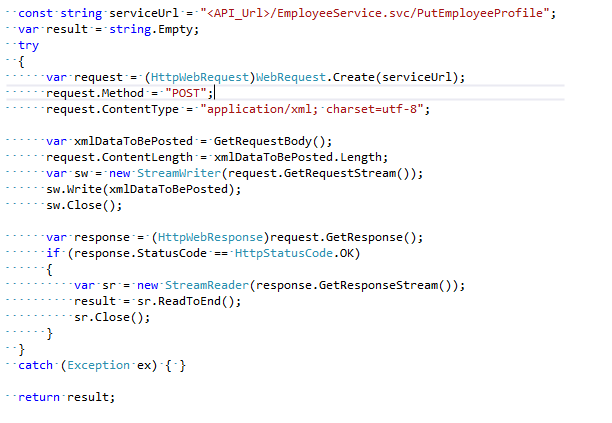
The following C# code shows how to call PutEmployeeProfile:
PutEmployeeCertification
Description
This will insert the employee certification information into ESO Scheduler for the designated customer. The insert will fail if the certification does not exist.
Signature
EmployeeCertificationResponse PutEmployeeCertification(EmployeeCertificationRequest request);
Request Body
An EmployeeCertificationRequest object in xml format.
<EmployeeCertificationRequest xmlns="https://www.net-scheduler.com/eProPlus">
  <CustomerId>(CustomerId)</CustomerId>
  <Password>(Password)</Password>
  <VendorKey>(VendorKey)</VendorKey>
  <EmployeeCertification>
    <EmployeeId>(EmployeeId)</EmployeeId>
    <Certification>(CertificationName)</Certification>
    <Number></Number>
    <ExpirationDate></ExpirationDate>
    <EffectiveDate></EffectiveDate>
    <Notes></Notes>
  </EmployeeCertification>
</EmployeeCertificationRequest>
EmployeeCertificationRequest Object
| Name | Type | Description |
|---|---|---|
| CustomerId | string | Customer id |
| Password | string | Password |
| VendorKey | string | Vendor key |
| EmployeeCertification | object | EmployeeCertification object |
EmployeeCertification Object
| Name | Type | Description |
|---|---|---|
| EmployeeId | string | Employee Id |
| Certification | string | Certification name |
| Number | string | Certification Number |
| ExpirationDate | string | Expiration Date |
| EffectiveDate | string | Effective Date |
| Notes | string | Notes |
Response Result (in XML format)
| Name | Type | Description |
|---|---|---|
| Status | int | 0 = Successful, -1 = Unsuccessful |
| ErrorCode | int | Error Code |
| ErrorMessage | string | Error Message |
<EmployeeCertificationResponse xmlns="http://schemas.datacontract.org/2004/07/API.Service" xmlns:i="http://www.w3.org/2001/XMLSchema-instance">
  <Status>0</Status>
  <ErrorCode>0</ErrorCode>
  <ErrorMessage />
</EmployeeCertificationResponse>
C# Code Sample
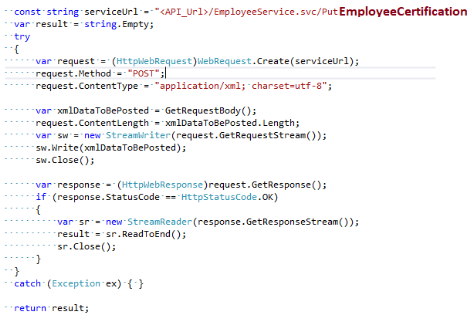
The following C# code shows how to call PutEmployeeCertification:
Error Code and Error Messages
Description
On errors, the system generates and returns a custom error message with error code. The table shows all error messages corresponding to their code number.
| Error Code | Error Message |
|---|---|
| 100 | Authentication Failed. Invalid customer ID or password. |
| 101 | Customer ID is required. |
| 102 | Password is required. |
| 103 | Customer ID and password are required. |
| 104 | Time format is invalid. |
| 105 | Start time is required. |
| 106 | End time is required. |
| 107 | Start and end time are required. |
| 108 | Date range cannot be more than one week. |
| 109 | Start time cannot be greater than end time. |
| 110 | Illegal access. |
| 111 | An internal or network error occurred. |
| 112 | Vendor does not exist. |
| 113 | Vendor key is required. |
| 114 | Usage Threshold Exceeded: «data type» |